![FullLogo-2019-1-e1576087441910.png]](https://hubspot.stayfi.com/hs-fs/hubfs/FullLogo-2019-1-e1576087441910.png?height=50&name=FullLogo-2019-1-e1576087441910.png)
- Understanding StayFinder Partner Statuses
- Become a Verified Partner
- Become a Preferred Partner
- Troubleshooting
Understanding StayFinder Partner Statuses
You can enhance the visibility of your listings in StayFinder by earning a Verified or Preferred status.
To become a Verified Partner, you need to confirm your listings through a StayFi account. Verified Partners enjoy priority sorting and a distinct Verified badge in their listings.
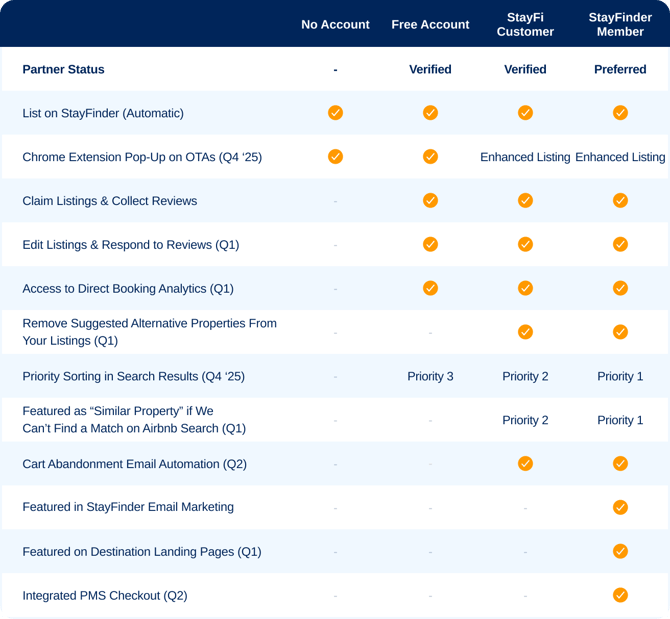
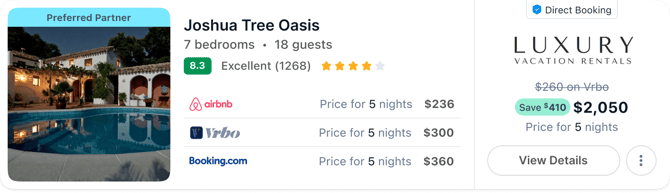
Preferred Partner status is available to StayFi WiFi Marketing customers when they become StayFinder Members. Preferred Partners enjoy benefits such as highest priority sorting, a distinct Preferred badge in their listing, feature in StayFinder guest marketing, and visibility throughout the platform.
You can find the full list of benefits per Partner Status in this table:
Example of sorting priority by Partner Status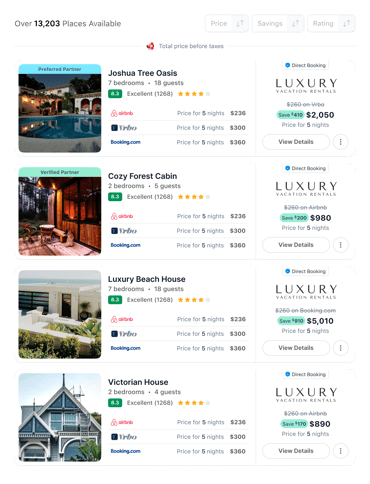
Become a Verified Partner
To become a Verified Partner, you need to confirm your StayFinder listings through a StayFi account.
1. Create a StayFi Account
Sign up for StayFi at: https://app.stayfi.com/signups/new
During the setup process, you will be asked for your credit card. Don't worry, you will not be charged if you only use your StayFi account for StayFinder. You will only be charged if you activate Email Marketing or purchase a WiFi Device. You will also be asked to select one of our services. You can choose any service to be able to proceed. This will not trigger any charges.
💡 You will be prompted to connect your PMS. If your PMS is listed as one of our supported integrations, we highly recommend connecting it.
This will help pre-fill available data and expedite the listing approval process.
2. Complete the basic steps of your StayFi account set up
Complete the two basic steps for setting up a StayFi account:
a. Set up your Guest Experience
If you only plan to use StayFi for StayFinder purposes, don't worry too much about this step. Just complete all required fields in order to be able to proceed. Setting up the Guest Experience is a requirement for creating your properties.
b. Create your Properties
Your StayFi properties will be later added as StayFinder listings. If the option to import properties from your PMS is available to you, we recommend doing so. This will help pre-fill available data and expedite the listing approval process. Otherwise, you can create your listings manually.
4. Fill in your listings URLs
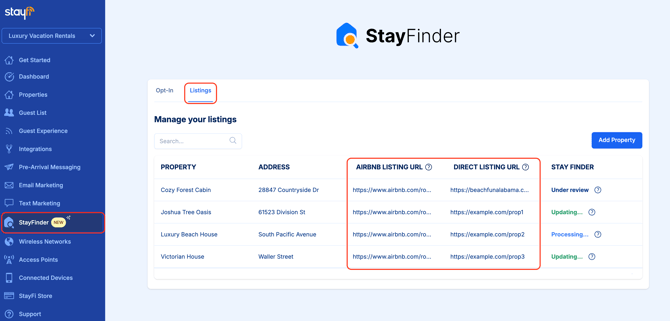
In the StayFinder page, head to the Listings tab. Fill in the Airbnb listing URL and Direct Booking listing URL for each property. Depending on which PMS you use, some of this data may be prefilled.
Important: ensure you enter the listing-specific URL in the Direct Booking column, and not the generic URL to your direct website's homepage or listing index.
5. Wait for approval
We will validate your listings to ensure the direct URL corresponds to the Airbnb URL for each property. Depending on your website provider, we might be able to validate this automatically within a few minutes. Otherwise, we will need to manually review it. This can take up to 72hs. Please returns to this page periodically to check on the status of your listings. Once they are approved, you will find the URL to your StayFinder listings.
6. Earn Verified Partner status
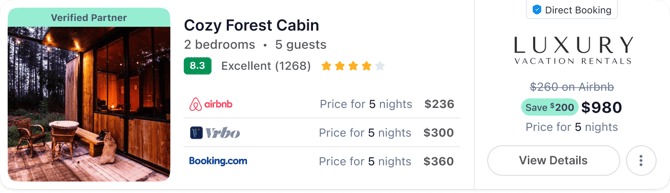
Once your listings are approved, you will become a Verified Partner. You will automatically enjoy benefits such as a Verified badge in your properties and preferred sorting.
Become a Preferred Partner
StayFi WiFi Marketing customers are eligible to become StayFinder Members and earn the Preferred Partner status.
Preferred Partners enjoy enhanced benefits, including:
- Identifying Preferred badge
- Highest priority sorting
- Feature in StayFinder email campaigns to guests
- Destination Page exposure
1. Join StayFinder as a member
To become a StayFinder Member:
- Start by completing all the necessary steps to become a Verified Partner.
- Navigate to the StayFinder page in your StayFi account. In the Opt-In tab, enable the toggle.
When you opt in to StayFinder, your guest data will be included in StayFinder's email marketing program.
You can opt out at any time.

2. Earn Preferred Partner status
Once your listings are approved and you have opted in to StayFinder, you will become a Preferred Partner. You will automatically enjoy benefits such as a Preferred badge in your properties, highest priority sorting, and feature in StayFinder email campaigns.
Troubleshooting and common questions
My listing was not approved
Double-check that both URLs are correct and point to active, public pages. You can update the links and resubmit. Ensure you entered property-specific URLs, and not your main website homepage or a general booking portal.
I submitted my listing but do not see it yet
Reviews are completed in order. If it has been less than 72 hours, no action is needed.
I still need help
If your listings are still under review or have an Error state, contact us for help. You can log in to StayFi, go to Settings>Support, and submit a ticket. Alternatively, reach out to support at support@stayfi.com.